
dreamforce event

Being a Dreamforce Veteran
As a San Franciscan working in the nonprofit Salesforce ecosystem, there are two big events each year that vie for my attention: Dreamforce and Burning Man. Some years they overlap, whereas other years they take place one right after the other. (If you’ve ever attended either, you can just imagine going to both, back-to-back!)

After attending both events many times, the years start to blur together: was that the year that Metallica played Moscone South? Or was that the year Daft Punk played at the trash fence? There were definitely people handing out tequila shots that year and asking me to sign up for an obscure “service” that I probably didn’t need. Then there was the memorable art at both events. Where was it that I saw those giant inflatable forest creatures? I’m pretty sure I did see them! There’s oontz-oontz music everywhere, and a pretty good chance you’ll be screeching Bruce Springsteen songs at 1am with your best buddies, some of whom were strangers only a few hours earlier.

No matter which event you attend, you will learn more than you thought possible and expand your horizons in the process. Skills you thought were useless will suddenly be in demand. Your ability to manipulate digital systems will enthrall everyone around you.

I don’t know if I can call myself a veteran(1) of either event, but I do feel like I have sufficient experience to offer advice to those who are lucky enough to be repeat offenders attendees. So, for those of you coming to the City by the Bay for the biggest annual technology brain-melting love-fest extravaganza–I’m talking about Dreamforce–here’s a list of advice from someone who has your *best* interests at heart.

  1. Do the Expo the right way.
    • You have to do the Expo. I mostly just float around the Expo and look for old friends and acquaintances. Like everything in life, your network is your power. Rekindle old relationships with anyone and everyone you recognize. Catch up on what they’re doing. With a year or more between seeing these people, you never know where they might be now; a lot can change in a year. Think of the Expo not as a vendor demonstration hall, but as a giant networking event.
    • Tchotchkes: Don’t just grab anything in sight. Be thoughtful about which tchotchkes you take, so that they don’t end up in the landfill the week after Dreamforce. C’mon folks, be green and only take items that are actually of use to you.
  2. Make a list for the Expo ahead of time.
    • If you really must get software demos, make a list ahead of time of the kinds of things you want to see. Interested in document merge capability? Then write that down, do some research on which companies you’d like to talk with, and then talk to those people. You can ignore all the other stuff that isn’t on your list until you have open blocks of time that aren’t scheduled. Unless of course they’re doing a Segway raffle, in which case: YES, SIGN UP FOR THE RAFFLE, YOU FOOL. (Note: Entering a raffle is different from grabbing another bobblehead.)
  3. Pace yourself.
    • Think of Dreamforce as an Ironman Triathlon that takes place over four days. The first day is literally just diving in and swimming several miles while everyone else is kicking and punching you, trying to make space in a sea of people all wearing the same thing and going to exactly the same place. Do you like getting punched? No? Then remember you can do the Expo any time. Wait until Thursday when the crowds have died down, the booth people are desperate for someone to talk to, and you just don’t have it in you to attend another email marketing automation session.
    • On day 3, remember that you still have to get on the bike and ride 112 miles. Now, I’m not saying you have to be at peak performance, but if you can’t make it out of bed and your first thoughts at 10:45 am on Thursday are: “Water! I need water. Am I on booth duty? Where am I? Why is someone holding my head in a vise?”, then you may want to dial it back on the evening festivities because you still have a triathlon to finish.
    • Those carts that Salesforce rolls out into the Expo at, like, 4 pm with free booze? Caution, my friend. I’m not saying you shouldn’t partake, but just remember to pace yourself as you still have some meetings ahead, probably a big dinner with coworkers and clients, and possibly some Springsteen karaoke to take care of at the end of the evening. MAKE SURE YOU CAN MAKE IT TO KARAOKE. That’s all I’m sayin’.
  4. Take the bus to the concert.
    • Seriously. Uber and Lyft will be buried in requests. Be smart and take the provided free transit. Bonus: you will meet people on the bus, and they just might be as cool as you! It’ll be just like riding an art car from 8:45 and D across to Frozen Oasis at 3:15 and Esplanade with some dude in the back passed out from too much Purple Drank. Not sure what that means? Ask a Burner.
  5. Leave space.
    • Your first instinct is to sign up for everything. They give you that book that lists all the cool stuff going on and you just want to do EVERYTHING in it!
    • Resist the temptation to do all the things. Seriously. Leave some space. Do a LOT of things, but save some time to roam the halls and meet people. Or grab a couch and relax for a few minutes. You never know who might sit down next to you. You can always get back up and attend that email marketing automation session that you’ve been dreaming about.
  6. Learn. But enjoy. But also: LEARN.
    • Developer Zone.
      • Your organization made an investment when they paid for your Dreamforce registration.  Make the most of this investment by checking out the Developer Zone. Even if you’re not a developer, talk to the folks there. You might learn something, or even discover a passion you didn’t know you had. APEX code might be intimidating, but, like learning any language, it just takes practice and patience.
    • Peer Learning
      • Remember when I mentioned that you should just float around the hallways and talk to people? Yeah, well, when you do talk to new people who do the kinds of things you do try to trade ideas, tips, and tricks.
      • Have you ever shown your Salesforce instance to someone outside of your organization? I know, it’s feels like walking around naked (side note: not recommended at Dreamforce), but showing each other your instances can be really mind-opening.
  7. Divide and conquer, but also regroup and share.
    • Send people from your organization to all sorts of different sessions, and then make time to come together to share what you learned. (Lunch is a good time, as is that vortex between 4pm and happy hour.)

Are you an actual veteran attending Dreamforce?

Make sure you check out VetForce and get set up with some of the veteran nonprofits who use Salesforce, like IAVA. Need an intro? Drop me a line and I’ll get you set up with some other veterans at Dreamforce. I’m the stranger who might become your new friend.

Amplify

Exponent Partners is Now an Amplify Sponsor

We are proud to announce that Exponent Partners is now an Amplify sponsor!  

Impact. Innovation. Diversity. These are the core values of Exponent Partners; they are the values that motivate our staff to meet the current challenges of today’s working world. As a social venture working exclusively with impact-focused nonprofits, our goal at Exponent Partners is to do well by doing good.

We achieve this goal by using technology to support the success and growth of our nonprofit clients. We know that by supporting an inclusive workplace, providing opportunities to innovate while bringing your whole self to work, we create a collaborative and cooperative environment for our employees.

With our values, we enable our staff and  organization to grow. We’ve been able to expand over the years, while maintaining a balanced female/male staff with women filling nearly 50% of our technical positions and nearly 40% of the roles on our leadership team, far exceeding the industry averages of 25% and 17% respectively. Equal pay for equal work is also a core belief. Our recent salary review demonstrated that for every dollar earned at Exponent Partners, men earn $0.97 and women earn $1.03.

To continue to be the inclusive and diverse team that we strive to be, we will work with Amplify to expand our knowledge and cast our net even wider.  We look forward forging a strong and positive learning relationship!

universal intake process

Increasing Efficiency with Universal Intake

<p>For many clients who are enrolling in multiple programs offered by a Human Services agency, the following scenario might be all too familiar.</p>

Meet Susan—a single mother who wants to register for a training program that will make her more employable. After filling out a lengthy form by hand, Susan meets with one of the agency’s employees who asks questions to supplement the information provided. Fast forward three weeks when Susan finds herself evicted from her current rental. She returns to the agency to find out if she is eligible to explore low-income housing services. Susan completes another form—one that is almost identical to the one she completed weeks ago, with the exception of a few extra questions. She then meets a new employee who asks that same questions that were posed during her previous visit.

The pain of this process is palpable on the agency side as well.

John has been working at the agency for almost a decade, during which time new programs have been added, but not much has changed with the client intake process. After a client fills out the required paperwork, John asks follow-up questions to fill in the blanks that the client skipped, and then the intake form is added to the client’s paper file, which is kept in the program’s department. When the client enters another program, the process is repeated; another paper file is created and housed elsewhere. More paperwork. More files. More data silos. The result is not only a time-consuming process for everyone involved, but also limited visibility into the big picture of the client and the agency.

Fast-forward to reporting time, when John’s manager asks him for a report that details the number of clients that the agency has served over the past year. And so it begins: the counting, the manual entry of data into an Excel spreadsheet, the removal of duplicates to get accurate numbers. John spends many hours on these tasks—hours that he would rather spend helping clients. The entire process is not only painful and time-consuming, but it is also ripe for human error.

Susan’s and John’s experiences are common place among Human Services agencies, especially ones that have under-invested in technology for various reasons–internal funding challenges, resistance to change, lack of internal capacity or alignment.

However, the tides are turning, largely due to increasing pressure from funders, changes in legislation, and the need to do more with less by streamlining processes.

And with these pressures and challenges come opportunities including:

  • An opportunity to make it easier for a client to gain access to your programs.
  • An opportunity to streamline the intake process for staff. An opportunity to simplify the report creation process.
  • An opportunity to spend more time helping people instead of pushing papers.

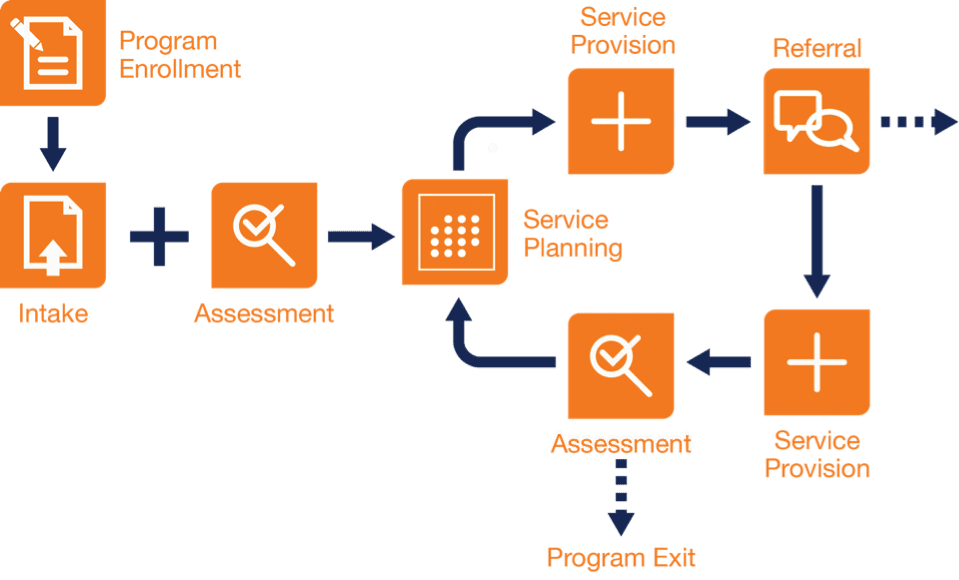
These opportunities can be seized when an agency implements a universal intake form—a distilled version of multiple intake forms across the agency’s programs—that is accessible to staff whenever they have internet access. The online form allows for rapid data capture of the client’s basic demographic information, as well as other information that is pertinent across programs, and then stores the data in the different places where it belongs (e.g., contact record, case record, referral, assessment, and/or household). Your agency’s universal intake form can be supplemented by additional program-specific forms. By having all of a client’s data housed in one system, your agency gains a complete view of the client and avoids the creation of duplicative information.

So, what does a universal intake form mean for clients and staff?

  • Clients: With universal intake, clients like Susan who use multiple programs within your agency will have a superior enrollment experience—one that is smooth and efficient.
  • Staff: For employees like John, their jobs will get a lot better, as they can quickly access key data online. They no longer have to gather information from colleagues and paper files, and then enter and manipulate data in a spreadsheet. The time saved can be used to provide more services to a larger number of clients.

Organizationally, an online universal intake form is a game changer in terms of identifying trends and promoting the right programs to the right clients at the right time. Your nonprofit will gain agency-wide reporting capabilities, giving your organization more data and better data, which can translate to improved service delivery and greater impact.

Want to see universal intake in action? Register for an upcoming webinar where we will demonstrate the universal intake process using Exponent Case Management (ECM).

Code Reviews: Boost Quality and Supercharge Your Team

“Code Reviews” have been used for decades in software engineering in order to deliver bug-free, high quality software to users. Historically, the primary focus has been on the code written by programmers – applying a formal process to focus on finding and fixing defects. Over the past few decades, there has been significant movement towards making reviews more agile, less resource-intensive, and applicable to work products other than programmers’ source code. This new application of “code reviews” can be very useful to Salesforce administrators and analysts, as well as developers.

While reviews can add steps to your process, they can ensure a better solution for your users and ultimately higher user adoption. Here, we’ll take a look at some of those benefits and some of the review opportunities available when building solutions on Salesforce.

BENEFITS OF REVIEWS
Benefit #1: Improved Quality
As a Salesforce consultant, your primary goal should be creating robust, correct, usable solutions that are scalable, maintainable, and add value for customers. Reviews are one of the most effective tools when working toward that goal. Logically, applying multiple perspectives to a problem results in solutions that are more likely to be correct. Here, we’ll focus primarily on code reviews, but reviewing architecture, design, and test plans can help uncover “big picture” issues that may be overlooked when focusing on the code. Be sure to consider each of those opportunities when implementing reviews on your project.

In many disciplines, we realize that to err is human and plan accordingly. Consider the number of rewrites, reviews, and edits an author will go through before publishing his final work. As Salesforce consultants, we must realize that we are “authors” and the quality of our work will improve as we seek the input and ideas of our coworkers.
“In a software-maintenance organization, 55 percent of one-line maintenance changes were in error before code reviews were introduced. After reviews were introduced, only 2 percent of the changes were in error. When all changes were considered, 95 percent were correct the first time after reviews were introduced. Before reviews were introduced, under 20 percent were correct the first time.”
~ Steve McConnell, “Code Complete”, p. 481

Benefit #2: Skill Building
While improving the quality of our work, reviews will also spread domain knowledge and improve consulting skills. A brief review of a requirements document or data flow diagram can help communicate details that might otherwise be tough to uncover. As a developer, I can’t count the number of tips and tricks I’ve learned by reviewing others’ code. Code reviews help build productive and skillful programmers.

Benefit #3: Communication
Last but not least, reviews are a very effective way to communicate domain and solution information among team members who may be each working on a different part of an app. Reviewing work products such as source code, workflow rules, or test scripts helps to communicate specifics at the more detailed level. Team mates who analyze each other’s work will understand the comprehensive picture of the app better and produce a more consistent product.

REVIEW METHODS
There are several review methods. Find one that fits the way your team works and implement it!

Formal (Fagan)
This is a careful and detailed process with multiple participants and multiple phases. Formal reviews are the traditional method, in which co workers attend a series of meetings and review line by line, usually using printed copies of the material. Formal inspections are extremely thorough and have been proven effective at finding defects, but also take significant time.
Over the shoulder
In this method, one person looks over the author’s shoulder as the latter walks through the code.
Email pass around (+ Google Docs)
Here, the author or source code management system emails code to reviewers and requests comments, such as through Google docs.
Pair programming (online tools)
“Pair programming” was introduced in the “Extreme Programming” methodology, and refers to two authors working together.
Tool assisted
This refers to any process where specialized tools are used in all aspects of the review: collecting files, transmitting and displaying files, commentary, and defects among all participants, collecting metrics, and giving product managers and administrators some control over the workflow.

The “Tool Assisted” method works well on Salesforce projects and fits in well with other best practices such as revision control and project management systems. When implemented in a Salesforce team, the process might look something like this:

  1. Create a branch within the source code repository where the code and configuration is stored.
  2. Edit and test your work in a development or sandbox org.
  3. Push your changes to the new branch in the repository. Include configuration changes, code, unit tests, comments, etc.
  4. Create a pull request and invite others to participate in the review.
  5. Reviewers evaluate the work and make inline comments. Review is based on requirements documents, user stories, and coding standards. Complete initial review within 24 hours
  6. If rework is required, return to step 2.
  7. Once all reviewers have approved the changes, the work is merged into the repository, where it can be deployed to the next org in the process.

Review Best Practices

  • Keep it small – 200 to 400 lines of code. This is what most people can review in 60-90 minutes.
  • When requesting a review, add documentation so that the design is understandable.
  • Take the time! When reviewing someone else’s work, take the time and effort to do a thorough job.
  • Keep it positive. Besides pointing out defects, comment on good design and best practices.
  • Use checklists
  • Address and/or resolve all comments from reviewers
  • Iterate (use findings to update checklists)

CODING STANDARDS
Well-written code is easy to read, understand, debug, and maintain. One key to attaining these attributes in your team’s code is to define coding standards – guidelines that may cover file organization, indentation, comments, declarations, statements, whitespace, naming conventions, programming practices, programming principles, architectural best practices, etc.

The following are example coding standards for languages typically used in Salesforce development. These should be modified to fit your team’s background, processes, and preferences. Be careful to avoid needless work and arguments over personal preferences. Make sure each standard is specific, unambiguous, and contributes to more readable, maintainable code.

Finally, note that these checklists are meant to be brief reminders. More verbose standards and samples should be provided to your development team.

Apex

  • Use config instead of code when possible
  • Clearly separate concerns (model / controller / trigger handler / view / tests)
  • Avoid duplicate code – add base classes, utilities, subroutines, etc.
  • Prevent SOQL injection
  • Handle all potential errors; comment cases where errors should be ignored
  • Provide useful and complete documentation for classes & methods
  • Write small, clear, single-purpose methods
  • Use descriptive names for classes, properties, methods, variables, etc.
  • Use whitespace to improve readability
  • CamelCase classes, ICamelCase interfaces, camelCase methods, properties, and variables, ALL_CAP finals
  • Use spaces instead of tabs
  • Make properties and parameters final when possible
  • No SOQL, DML, or @future calls inside loops
  • Use static queries, binding variables or escapeSingleQuotes to prevent SOQL injection attacks
  • Bulkify all trigger and asynchronous code
  • Use asynchronous code (future, batch, scheduled) when possible
  • No hard-coded Ids
  • Create at most one trigger per object
  • Use centralized trigger processing (ITrigger pattern)
  • Use custom settings, labels, or metadata types for configurable settings and preferences

Apex Unit Tests

  • Assert proper behaviors
  • Test conditionals, valid inputs, invalid inputs, error conditions
  • Provide useful and complete documentation
  • Avoid duplicate code – add base classes, utilities, subroutines, etc.
  • System.runAs a specific user
  • Write tests for multiple records
  • Use mocking framework for callout testing
  • Don’t rely on existing data
  • 100% unit test coverage

Visualforce

  • Use config instead of code when possible
  • Avoid duplicate code – use components, includes, templates, etc.
  • Provide useful and complete documentation
  • Prevent cross-site-scripting attacks
  • Move CSS and Javascript to static resources
  • Include Javascript at the bottom of the page
  • Use transient properties, read-only pages, and caching when possible
  • Use whitespace and indenting to improve readability

Javascript

  • Move Javascript to a static resource
  • Load Javascript at the bottom of the page
  • Wrap all code in a namespace or anonymous function to avoid collisions
  • Avoid duplicate code – add utilities, subroutines, etc.
  • Handle all potential errors; comment cases where errors should be ignored
  • Provide useful and complete documentation
  • Write small, clear, single-purpose methods
  • Use descriptive names for methods, variables, etc.
  • Use whitespace to improve readability
  • Use spaces instead of tabs
  • Declare all variables and functions

Drive System Adoption in your Organization: Bancroft

Recently we worked with human services nonprofit Bancroft. Along the way, we had the chance to hear more about their long-running programs and 130-year history from Fina Nash and Rex Carney, VP of Information Technology and VP of Marketing and Communications at Bancroft, respectively.

We learned about their inspiring goal to change the way that society views individuals with neurological impairment. Bancroft offers a variety of services to both children and adults with traumatic brain injuries, as well as those with developmental and behavioral disabilities.

To aid them in this work, they built an admissions, intake and marketing solution to streamline their internal processes. This was also part of a larger vision surrounding Bancroft’s data. Carney noted, “Nonprofits increasingly need to think about being more efficient and moving faster. We need to be able to respond to partner and funder relationships with clear data relating to service lines. The ability to make better, data-driven decisions is crucial!”

After the system’s implementation, Nash and a few other members of Bancroft led an effective initiative for ramping up its adoption across their staff. We think that their model could serve as a great example for other nonprofits. Read on to find out how they did it!

Changing the face of neurological impairment

“Bancroft offers a continuum of care for those we serve, and we function like a special needs school, a rehab/outpatient facility, and a residential program all rolled into one,” Carney said. Bancroft, which serves 1500 per day, across New Jersey, Pennsylvania, and Delaware, is a heavyweight in its field.

Their service lines are divided by brain injury rehabilitation, special education and autism services. These programs are further subdivided into children and adults. For children, services include school, day services, general health, and behavioral stabilization. For adults, the range expands to include vocational services, group homes, and more.

Bancroft is staffed by over 2000 employees, including teachers, nurses, clinical staff, behavioral psychologists, and neuropsychologists.

Their work helps a diverse group of people. One such person is Brian Davis, who suffered a traumatic brain injury after his tractor and trailer was hit by a truck that swerved into his lane. Bancroft helped Davis sort through the physical challenges and emotional pain, and ultimately return to his farming livelihood. You can watch his moving speech from a “Bancroft Unplugged” 2012 event here.

Another such person is Devonlee Mullings [pictured], a 5-year-old boy with autism who wasn’t reaching his goals in his public special-education program. After just three months in Bancroft’s Early Education Program, Devonlee made big leaps in his abilities. Now, he raises his hand in class and uses full sentences to answer questions. He has fewer temper tantrums and is actively participating in learning activities.

Devonlee’s mother, Blassent Mullings, said, “Devonlee is doing things now that he was never able to do before coming to Bancroft. He’s more focused,  he’ll sit and play longer. Before, he would just run away. He communicates more, he’s learning to share. We are so happy — it’s like we struck gold.”

Their powerful system adoption strategy and how they did it

In order to make full use of their new admission and marketing management solution (and enable greater speed for tasks such as intake for individuals like Brian Davis and Devonlee Mullings), Bancroft needed a smooth transition to the new system by their staff. Nash and a small crew from the IT team headed a successful staff training initiative.

Bancroft achieved this feat with a multi-pronged approach. They developed training materials in-house and distributed them to staff. They held a group classroom training. Later, they offered follow-up training for whomever requested it, as many times as requested, personalized to that staff member’s work and location. They also employed Salesforce Chatter as a communication tool to remind staff of various tips and techniques. Nash estimates that within three to four months, the number of staff users had climbed from six to 100.

How to foster system adoption in your organization

Nash offers the following advice if you are looking to spearhead a similar initiative:

  • Follow keep-it simple principles. Use as little info as you need to have staff understand. Don’t overwhelm!
  • Be to able to train on the process versus product. That is, connect with your audience by making the training relevant to them, showing what they stand to gain in their work by transitioning to the new process.
  • Paint a clear picture for staff. You can employ training handouts illustrating “this is the current process” and draw it out visually, so they can envision how exactly the process will change for them.
  • Have follow-up. Plan a three-month period where staff can contact you to be instructed again. At Bancroft there were fast studies, the majority got it after training, and some needed three to five follow-ups. Account for all stages of competency.
  • Incentivize team with easy-to-create reports or other perks of the system that they have been wanting to accomplish in their work.
  • Establish champions of the new system in each of your service lines.

All images by Bancroft, used with permission.